
How to Remove Review Amazon Buyer & Seller Guide 2026 | Bluebug.io
Follow Bluebug's proven steps process to legally remove review amazon. Protect your brand, boost sales. Get your free audit to start!

Samaa
April 19, 2026How to remove review amazon (Buyer & Seller Guide 2026)
Understanding Amazon's Review Removal Policies in 2026
Amazon maintains stringent policies regarding product reviews to ensure authenticity and maintain a trustworthy shopping environment. For sellers, knowing these legalities of what sellers need to know about removing Amazon reviews is paramount to protecting their business. Not all reviews can be removed, but specific violations open avenues for action.
The platform's terms of service explicitly prohibit review manipulation, including incentivized reviews, fake reviews, or reviews posted by competitors. Recent updates in 2026 further emphasize transparency and fairness. Understanding these rules is your first step in successful removal.
Can a Seller Remove a Negative Review on Amazon?
Directly removing a negative review as a seller is generally not possible unless it violates Amazon's Community Guidelines. Sellers cannot simply delete reviews they dislike. However, there are legitimate pathways to appeal or report reviews that breach policy. This is critical for boosting conversion rates through review management.
What Constitutes an Amazon Review Policy Violation?
Amazon's Community Guidelines outline several types of prohibited content. These include promotional content, abusive language, private information, off-topic reviews, or reviews from a seller's direct family or employees. Identifying these violations is key to a successful removal request.
How to Remove Your Own Amazon Review as a Buyer
As a buyer, you have more direct control over the reviews you've posted. If you've changed your mind, made an error, or simply wish to retract your feedback, Amazon provides a straightforward process. This flexibility is a key aspect of the buyer experience.
Step-by-Step: Deleting or Editing Your Amazon Customer Review
To remove or edit a review you've written:
- Log in to your Amazon account.
- Go to "Your Account" and then "Your Amazon Profile."
- Locate the review you wish to remove or edit.
- Click the "Delete" or "Edit" button next to the review.
- Confirm your action.
This process is quick and effective, allowing you to maintain accurate feedback. You can easily delete an Amazon review you've submitted as a customer.
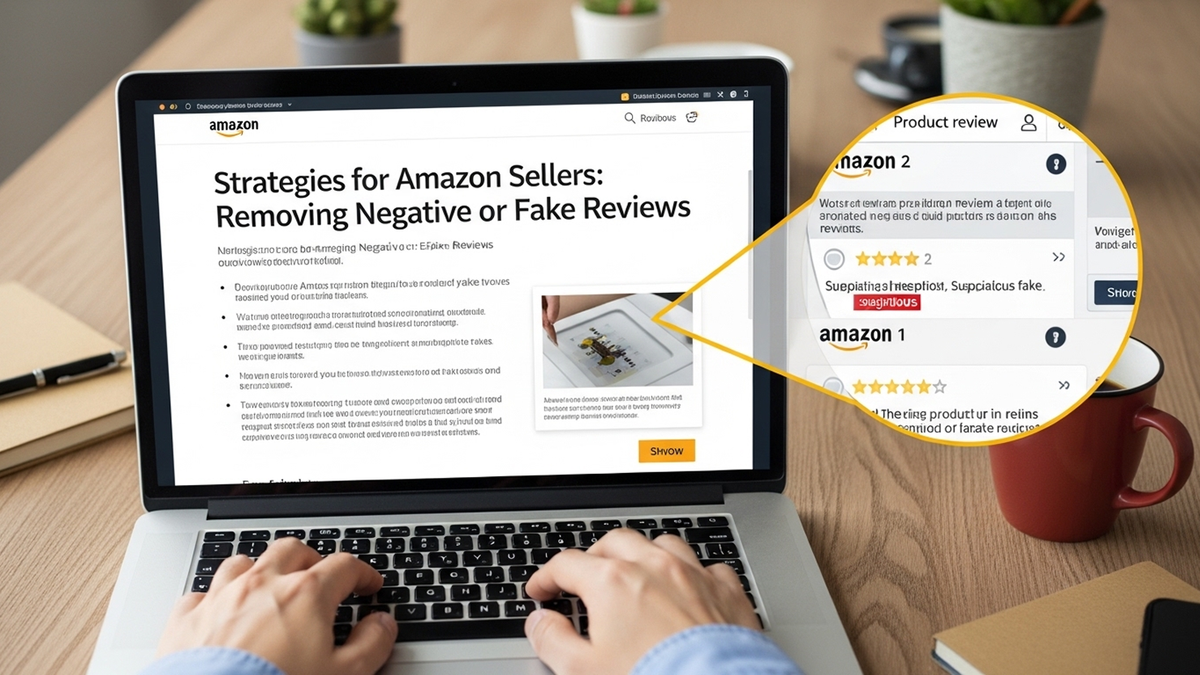
Strategies for Amazon Sellers: Removing Negative or Fake Reviews
For Amazon sellers, negative or fake reviews can significantly impact sales and brand reputation. Proactive review management and negative review removal are crucial. There are distinct strategies for addressing different types of problematic feedback, focusing on Amazon's policies.
How Do You Get Amazon to Remove a Fake Review?
Fake reviews are a serious threat to seller credibility and are a clear violation of Amazon's policies. When confronted with a fake review, gathering evidence is critical. This might include suspicious review patterns, generic content, or reviews from unverified purchasers. Reporting these effectively can lead to removal. Tools like an Amazon review checker can help identify suspicious activity.
My Competitor Left a Fake Review, What Can I Do?
If you suspect a competitor has left a malicious fake review, documenting the evidence is paramount. Look for patterns in their other reviews, their seller profile, and any direct communication. Report these incidents to Amazon's Seller Support with detailed information. This falls under how to detect and report fraudulent competitors.
Is It Possible to Appeal an Amazon Review?
Yes, sellers can appeal reviews if they believe they violate Amazon's guidelines. This involves contacting Seller Support and presenting your case with supporting evidence. Be specific about which policy was violated, providing screenshots and order IDs where relevant. Persistence and clear communication are key to a successful appeal. Understanding Amazon's policy on review removal is vital here.
Amazon Won't Remove a Review, What Are My Options?
If Amazon initially declines to remove a review despite your efforts, don't give up. Re-evaluate your evidence, consider if there are other policy violations you missed, and re-submit your claim with additional details. Sometimes, escalating the issue to a different department within Seller Support can yield better results. You might also consider seeking guidance on Amazon seller legal issues if the situation is severe.
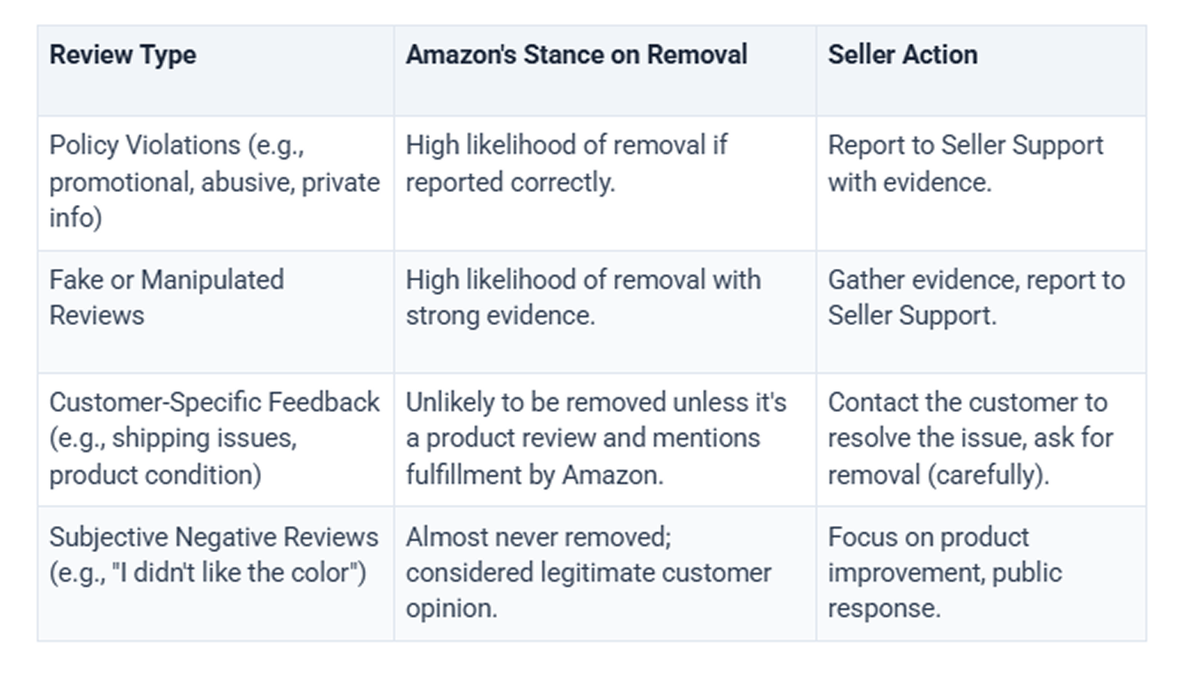
When Amazon Will and Won't Remove a Review
Understanding the distinction between removable and non-removable reviews is crucial for sellers. Amazon has clear criteria, and not every negative review will qualify for removal. This section clarifies common scenarios.
How Amazon Negative Reviews Can Kill Sales (And What You Can Do About It)
Negative reviews, especially if numerous or highly visible, can drastically reduce sales and conversion rates. Consumers heavily rely on social proof, and bad reviews erode trust. Addressing them proactively, through removal or professional response, is vital for business health. Learn more about how Amazon negative reviews can kill sales.
Ethical Approaches to Managing Negative Feedback and Review Removal in 2026
While removing reviews is a goal, ethical management of all feedback is paramount for long-term success on Amazon. Engaging with customers and improving products based on feedback can turn a negative into a positive. Handling bad reviews on Amazon professionally is a skill every seller needs.
How to Ask a Customer to Remove Negative Feedback on Amazon
You can contact a customer to resolve an issue, but you cannot directly ask them to remove or change their product review. You can, however, offer a solution to their problem. If they are satisfied, they might choose to remove their feedback voluntarily. This nuanced approach is detailed in guides on asking a customer to remove negative feedback.
Leveraging Professional Review Removal Services for Amazon Sellers UK
Frequently Asked Questions About Removing Amazon Reviews
Can Amazon remove a seller's product review?
Amazon can and does remove product reviews if they violate the platform's Community Guidelines. This applies to reviews left by any user, including those suspected of being from competitors or those that are clearly fake or manipulative. Amazon's systems continuously monitor for such violations.
How long does it take for Amazon to remove a review after reporting?
The time it takes for Amazon to remove a reported review can vary significantly. Simple violations might be addressed within a few days, while more complex cases requiring investigation could take weeks. Following up with Seller Support is advisable if you don't see action within a reasonable timeframe.
What happens if I try to remove a review that doesn't violate Amazon's policy?
If you attempt to remove a review that does not violate Amazon's policies, your request will likely be denied. Repeated attempts to remove legitimate reviews could potentially flag your account for review manipulation, which is a violation itself. Always ensure your removal requests are based on clear policy breaches.
Is it possible to track the status of my Amazon review removal request?
Yes, you can typically track the status of your review removal requests through your Seller Central case log. Each report generates a case, allowing you to monitor Amazon's response and any actions taken. Keeping detailed records of your communications is always recommended for future reference.
Why would Amazon delete negative reviews sometimes?
Amazon deletes negative reviews when they violate their Community Guidelines, not simply because they are negative. This includes instances of abusive language, off-topic content, personal attacks, or evidence of review manipulation. The goal is to maintain fair and relevant feedback. Learn more about why Amazon deletes negative reviews.
What are the common reasons Amazon denies review removal requests?
Amazon most commonly denies review removal requests when the review does not clearly violate their Community Guidelines. Often, sellers mistake negative but legitimate customer feedback as a violation. Lack of sufficient evidence or an unclear explanation of the policy breach are also frequent reasons for denial.
Resources and Further Reading
- Amazon Seller Central: Customer Reviews: Amazon's official guide for sellers on customer reviews.
- Federal Trade Commission: Disclosures 101 for Social Media Influencers: Provides context on ethical review practices and disclosures (relevant to incentivized reviews).
Ready to Work With a Trusted Bluebug Expert?
If you're an Amazon seller in the UK struggling with negative Amazon reviews, Bluebug.io is your dedicated partner. We specialize in legally and ethically removing problematic reviews, helping you protect your brand's reputation and boost your sales. Our expert team understands Amazon's complex policies and provides proven strategies to achieve tangible results, ensuring your listings reflect genuine customer satisfaction. Don't let unfair feedback hinder your success; let us help you regain control and drive growth. Contact Us.
Keep reading
Amazon Review Removal vs. Review Burial: A UK Seller's Ethical Guide
Understand Amazon Review Removal vs. Review Burial. Learn Amazon's policies, legitimate removal steps, and the severe risks of black-hat tactics.
Can Friends & Family Leave Reviews on Your Amazon Products: UK Guide
Can Friends & Family Leave Reviews on Your Amazon Products? No. Learn Amazon's strict policies, detection methods, and compliant strategies for UK.
Can You Offer A Refund In Exchange For Amazon Reviews? UK Guide 2026
Can You Offer A Refund In Exchange For Amazon Reviews? Understand Amazon's UK policies, penalties, and compliant strategies. Safeguard your brand.