
The Seller's Guide to Sentiment Analysis: Turning Amazon Reviews into Actionable Insights
In the world of e-commerce, Amazon reviews are your most valuable asset. But simply having a high star rating isn't enough.

Samaa
September 12, 2025
The Power of Sentiment Analysis for Amazon Sellers
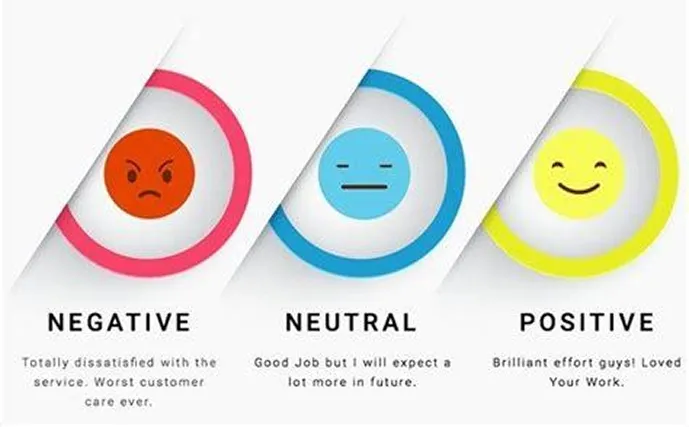
In the world of e-commerce, Amazon reviews are your most valuable asset. But simply having a high star rating isn't enough. To truly understand your customers and gain a competitive edge, you need to dig deeper—and that's where sentiment analysis of product reviews comes in.
Sentiment analysis
How to Conduct Sentiment Analysis on Your Amazon Reviews
You don't need to be a data scientist to start analyzing your reviews. You can begin with manual methods and then scale up with automated tools.
Conduct Sentiment Analysis
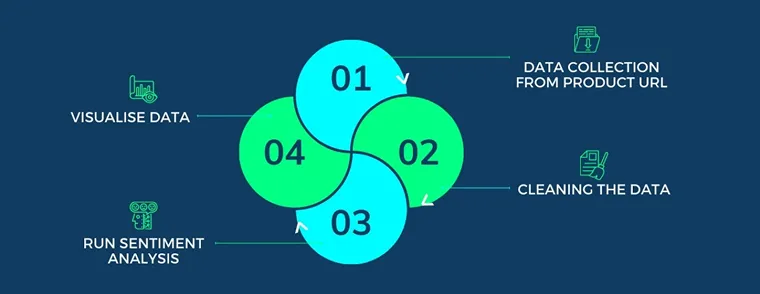
Step 1: Gather Your Review Data
Start by exporting all of your product reviews. You can either manually copy and paste them into a spreadsheet or use a fake review checker and data extraction tool to collect them more efficiently. For a comprehensive strategy, you should also include your competitor’s reviews.
Step 2: Choose Your Analysis Method
- Manual Review: For a small number of reviews, you can read each one and assign a sentiment score (e.g., positive, negative, or neutral). You can also tag reviews with specific keywords like "delivery," "quality," or "size" to categorize the feedback.
- Automated Tools: As your review volume grows, a dedicated tool is essential. Services like BlueBug.io's review management platform use advanced algorithms to automatically analyze sentiment, identify key themes, and track trends over time.
Step 3: Identify Key Themes and Trends
Once you have your data, look for patterns. Are most negative reviews mentioning the same issue, such as a product breaking after a few weeks? Are positive reviews consistently highlighting a specific feature? By tracking these themes, you can pinpoint exactly what’s working and what isn’t. This data is far more valuable than a simple star rating.
From Data to Decisions: Turning Insights into Action
Data is only useful if it leads to action. Here’s how to use sentiment analysis to improve your business:
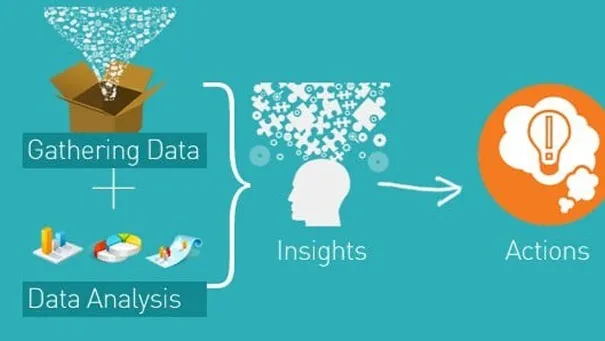
Turning Insights into Action
Improve Your Product Listing and Marketing
Use the language and phrases your customers use in their verified review content. If you find that a key product feature is consistently praised, highlight it in your product description and bullet points. This helps you speak your customers' language and boost conversions. To learn more about optimizing your listing, read our guide on how to get positive reviews on Amazon.
Enhance Your Product
Sentiment analysis can reveal critical design or quality flaws. If a significant number of reviews mention a weak component or a confusing instruction manual, you can address the problem in your next product iteration. This proactive approach not only improves customer satisfaction but also helps you build a more durable and profitable product.
Combat Fake Reviews
Unnatural spikes in negative sentiment can be a sign of a targeted attack from a competitor. A sentiment analysis tool can flag these anomalies, helping you quickly identify a fake Amazon review. Timely detection is key to protecting your brand's reputation and avoiding a hit to your sales.
FAQ: Your Guide to Amazon Sentiment Analysis
Yes. By analyzing competitor reviews, you can find gaps in the market and identify what customers are looking for but not getting from existing products. This allows you to create a superior product that addresses a genuine need.
While related, they are different. A fake review checker focuses on identifying fraudulent reviews that violate Amazon's policies. Sentiment analysis focuses on understanding the emotional tone of reviews, whether they are real or fake. Both are crucial for a comprehensive review management strategy.
While many tools exist, a professional Amazon review removal service like BlueBug.io often includes advanced sentiment analysis as part of its platform. This allows you to both understand your reviews and take action to remove inappropriate ones, all in one place.
Ready to Turn Reviews into Your Greatest Advantage?
Understand your reviews, protect your brand, and grow with BlueBug.io’s expert Amazon review insights.
Keep reading
Amazon Review Removal vs. Review Burial: A UK Seller's Ethical Guide
Understand Amazon Review Removal vs. Review Burial. Learn Amazon's policies, legitimate removal steps, and the severe risks of black-hat tactics.
Can Friends & Family Leave Reviews on Your Amazon Products: UK Guide
Can Friends & Family Leave Reviews on Your Amazon Products? No. Learn Amazon's strict policies, detection methods, and compliant strategies for UK.

Can You Offer A Refund In Exchange For Amazon Reviews? UK Guide 2026
Can You Offer A Refund In Exchange For Amazon Reviews? Understand Amazon's UK policies, penalties, and compliant strategies. Safeguard your brand.