

How to remove a negative amazon review: The Ultimate UK Seller's Guide for 2026
As an Amazon Expert at Bluebug, SAMH understands the critical impact negative reviews have on your sales and reputation. For UK sellers, knowing how to remove a negative amazon review is paramount. We equip you with proven strategies to navigate Amazon's complex review landscape and protect your brand integrity, ensuring your business thrives.
Search Intent Analysis
UK Amazon sellers facing negative reviews are actively seeking actionable, legal, and ethical methods to address and remove them. This article aims to provide UK Amazon sellers with a comprehensive guide on how to address and remove negative Amazon reviews, covering legal, ethical, and practical strategies to protect their brand reputation and sales performance on the platform.
Understanding Amazon's Review Policies: Product Reviews vs. Seller Feedback
For Amazon sellers, distinguishing between product reviews and seller feedback is fundamental to effective reputation management. Each type of feedback serves a different purpose and is governed by distinct Amazon policies, making the approach to resolve or remove them entirely different. Confusing the two can lead to wasted effort and frustration.
What is Amazon Product Review?
Product reviews focus solely on the item itself—its quality, features, and performance. These reviews appear on the product detail page and are critical in influencing buyer purchasing decisions and a product's search ranking. They are intended to provide unbiased insights into a product's merits and drawbacks from a customer's perspective.
What is Amazon Seller Feedback?
Seller feedback reflects a buyer's experience with your service as a merchant. This includes aspects like shipping speed, packaging quality, and customer communication. This feedback appears on your seller profile page and directly impacts your Seller Performance Metrics and eligibility for the Buy Box.
Why Differentiating Matters for Your Brand's Health
The distinction is vital because Amazon has different rules and mechanisms for an Amazon remove feedback request depending on whether it's seller feedback or a product review. Attempting to apply product review removal tactics to seller feedback, or vice-versa, will likely be unsuccessful and could potentially lead to policy violations.

When Can You Legally Get a Negative Amazon Review Removed? (Amazon's Guidelines in 2026)
It's crucial for UK sellers to grasp Amazon's strict review policies. You cannot simply "delete" a negative Amazon review. Instead, you must identify if it violates Amazon's guidelines and then request its removal. Amazon aims to maintain the integrity of its review system, ensuring feedback is genuine and helpful to buyers.
What types of Amazon reviews violate policy?
Amazon's Community Guidelines outline specific violations that can lead to review removal. Knowing these is your first step in understanding if you can legally get a negative Amazon review removed. Common violations include:
- Promotional Content: Reviews that are advertisements for a product or service, or contain external links.
- Offensive Content: Reviews containing obscenities, hate speech, sexually explicit material, or harassment.
- Personal Information: Reviews that disclose private information about other customers or sellers.
- Irrelevant Content: Reviews that do not pertain to the product itself, such as comments about pricing or shipping issues (these should be seller feedback).
- Fake or Manipulated Reviews: Reviews posted by competitors, incentivised reviews, or reviews from accounts with a conflict of interest.
- Medical Claims: Reviews that offer medical advice or claims.
- Competitor or Pricing Mentions: Reviews that refer to external pricing or competitors.
What about reviews related to Amazon FBA issues?
If a product review is entirely about the fulfilment experience for an FBA order (e.g., "Shipping was slow"), Amazon may strike-through or remove the feedback, as this falls under Amazon's responsibility. However, if the review combines product and FBA issues, removal is less likely.
Step-by-Step: How to Report a Product Review for Policy Violations
If you believe a product review violates Amazon's Community Guidelines, you can report it. While Amazon provides a "Report Abuse" button on each review, filing a formal case, especially through Brand Registry, is often more effective.
How do I report an abusive Amazon review?
To report an abusive Amazon review:
- Identify the Violation: Carefully read the review and pinpoint the exact policy violation (e.g., profanity, competitor mention, off-topic content).
- Gather Evidence: Take screenshots of the review and note the ASIN, reviewer name, and date.
- Navigate to the Product Detail Page: Find the product listing with the offending review.
- Click "Report Abuse": Locate the "Report Abuse" link next to the review. This is a quick initial step, but often insufficient on its own.
- Submit a Case via Seller Central (or Brand Registry for best results):
- Log into your Seller Central account.
- Go to 'Help' -> 'Get Support' -> 'Contact Us'.
- Select 'Selling on Amazon issue' and then 'Product reviews'.
- Clearly explain the violation, referencing Amazon's specific guidelines and providing your evidence.
Using Brand Registry for Review Violations
For brand-registered sellers, Amazon Brand Registry offers a dedicated tool for reporting review violations, which is generally more effective than the generic "Report Abuse" button.
- Log into Brand Registry: Access your Brand Registry account.
- Navigate to "Report a Violation": Find the section for reporting intellectual property or policy violations.
- Select "Report a Review Violation": Choose the specific option related to reviews.
- Provide Details: Fill out the form with the ASIN, review ID, a clear explanation of the violation, and any supporting evidence. The more specific you are, the higher your chances of success.
Persistence is key; if your initial request is denied, consider reopening the case with additional details or escalating if you have strong evidence of a clear policy breach.
Strategies for Removing Negative Seller Feedback on Amazon
Negative seller feedback directly impacts your seller metrics and can affect your Buy Box eligibility. The process for removing seller feedback is distinct from product reviews and often has a higher success rate if the feedback meets specific criteria.
What are the exact criteria for Amazon to remove feedback?
Amazon will generally remove seller feedback only under very specific circumstances. These include feedback that:
- Contains obscene or profane language.
- Includes seller-specific, personally identifiable information (e.g., email addresses, full names).
- Is entirely a product review (e.g., "The widget broke after two uses," rather than "Seller shipped late").
- Is entirely about the fulfillment experience for an FBA order.
Note that if the feedback contains both a product review and comments about your service, Amazon typically will not remove it.
Can Amazon remove customer feedback?
Yes, Amazon can remove customer feedback if it meets their specific criteria for removal, as outlined above. However, they generally do not remove feedback that complies with their policies, even if it is negative or unfair. The system is designed to maintain the integrity of the feedback system. For UK sellers, understanding these nuances is crucial to preserving your reputation. Our Amazon Negative Feedback guide offers further insights.
Can You Ask a Customer to Remove a Negative Review? (Ethical Approaches)
Engaging directly with customers to resolve issues can be a powerful way to manage negative feedback. However, it's vital to do so ethically and within Amazon's strict guidelines to avoid policy violations.
Is it against Amazon policy to ask a buyer to remove a review?
No, it is generally not against Amazon's policy to ask a buyer to remove a review, provided you do not offer any incentives or pressure them. The key is to focus on resolving their issue first. Amazon's Seller Code of Conduct explicitly states that sellers may "request feedback and reviews from your own customers in a neutral manner," but may not "pay for or offer an incentive... in exchange for providing or removing feedback or reviews" or "ask customers to write only positive reviews or ask them to remove or change a review".
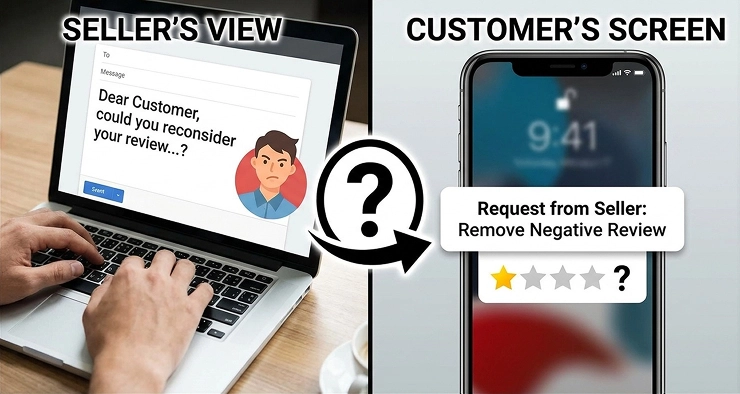
How to contact a customer to change a negative review
If you aim to have a customer change or remove their review, follow these ethical steps:
- Address the Issue Promptly: Use Amazon's Buyer-Seller Messaging system to genuinely offer assistance and resolve the customer's problem.
- Provide Excellent Service: Go above and beyond to make the customer happy. Offer a refund, replacement, or solution that addresses their complaint.
- Wait for Resolution: Ensure the customer is fully satisfied with the resolution before proceeding.
- Make a Polite, One-Time Request: Once the issue is resolved, you can send a polite, one-time message asking if they would consider updating or removing their review based on the positive resolution. Emphasise that this is entirely their choice.
Remember, never offer compensation or incentives for removal. Focus purely on customer satisfaction. For more detailed guidance, see our article on how to ask a customer to remove negative feedback on Amazon.
Dealing with Fake or Malicious Negative Reviews on Amazon
Fake or malicious reviews pose a significant threat to Amazon sellers, impacting reputation and sales. Identifying and addressing these requires vigilance and an understanding of Amazon's stance and evolving UK regulations.
How to spot fake Amazon reviews
Spotting fake reviews can be challenging, but certain red flags can help you identify them: Reviews with poor grammar, repetitive phrasing, or an overly emotional tone can be indicators. Look for patterns in reviewer profiles, such as many reviews posted in a short period or reviews for unrelated products. For a deeper dive into detection, read our guide on how to spot fake Amazon reviews and remove them safely.
Frequently Asked Questions (FAQ)
Can Amazon remove a negative review if it's just unfair?
Amazon generally will not remove a negative review simply because it is unfair or you disagree with the customer's opinion. Reviews are intended to reflect genuine customer experiences. Removal is typically reserved for reviews that violate Amazon's Community Guidelines, such as containing offensive language, personal information, or being off-topic.
How long does it take for Amazon to remove a review?
The time it takes for Amazon to remove a review can vary. For automated feedback removal requests (for seller feedback), the process can be almost instant if the criteria are clearly met. For product review violations reported through Seller Central or Brand Registry, it can take several days to a few weeks, depending on the complexity of the case and Amazon's investigation process.
What if Amazon refuses to remove a review that violates policy?
If Amazon initially refuses to remove a review that you believe clearly violates their policy, you can reopen the case with additional evidence or a more detailed explanation. Persistence is often key. Ensure you cite the specific Amazon Community Guideline that has been violated. If you are a brand-registered seller, using the Brand Registry tools can sometimes yield better results.
Is it possible to prevent negative reviews?
While it's impossible to prevent all negative reviews, you can significantly reduce their occurrence through proactive measures. These include providing excellent customer service, accurately describing your products, ensuring high-quality packaging and fast shipping, and promptly addressing customer inquiries. Proactive communication and a commitment to customer satisfaction are your best defenses.
Resources and Further Reading
Conclusion
Successfully navigating how to remove a negative amazon review is crucial for UK Amazon sellers looking to protect their brand and maintain strong sales. By understanding Amazon's distinct policies for product reviews and seller feedback, identifying legitimate violations, and employing ethical customer service strategies, you can effectively manage your online reputation. While Amazon's guidelines are strict, proactive engagement and knowing when to seek expert assistance can significantly improve your chances of removing detrimental feedback and fostering a thriving business on the platform.
Ready to Take the Next Step?
If you're a UK Amazon seller struggling with negative reviews and need expert assistance to legally and ethically remove them, Bluebug is here to help. Our specialised service is designed for Amazon sellers who have negative Amazon reviews, providing the main and only service to remove negative Amazon reviews legally. Don't let unfair feedback impact your business any longer. Learn more about how to effectively communicate with Amazon and get the results you need by reading our guide: contact Amazon Seller Support for effective review removal.