
The Ultimate Guide to Contacting Amazon Seller Support & Getting Real Results
Frustrated with generic replies? Our definitive guide shows you how to navigate Amazon Seller Support, write effective cases, and escalate issues

Muhammed Nasser
October 8, 2025For nearly every Amazon seller, from the seven-figure brand to the ambitious newcomer, two words can trigger a unique mix of hope and frustration: Seller Support.
The good news? It doesn’t have to be this way.
Getting effective help from Amazon Seller Support isn't about luck; it's about strategy. It’s about understanding the system, preparing your case correctly, and knowing exactly what to say.
At BlueBug, we've managed thousands of support cases on behalf of our clients, turning account-threatening crises into resolved tickets. This is our definitive guide to mastering Amazon Seller Support and getting the results your business depends on.
Understanding the System: Why Is It So Difficult?
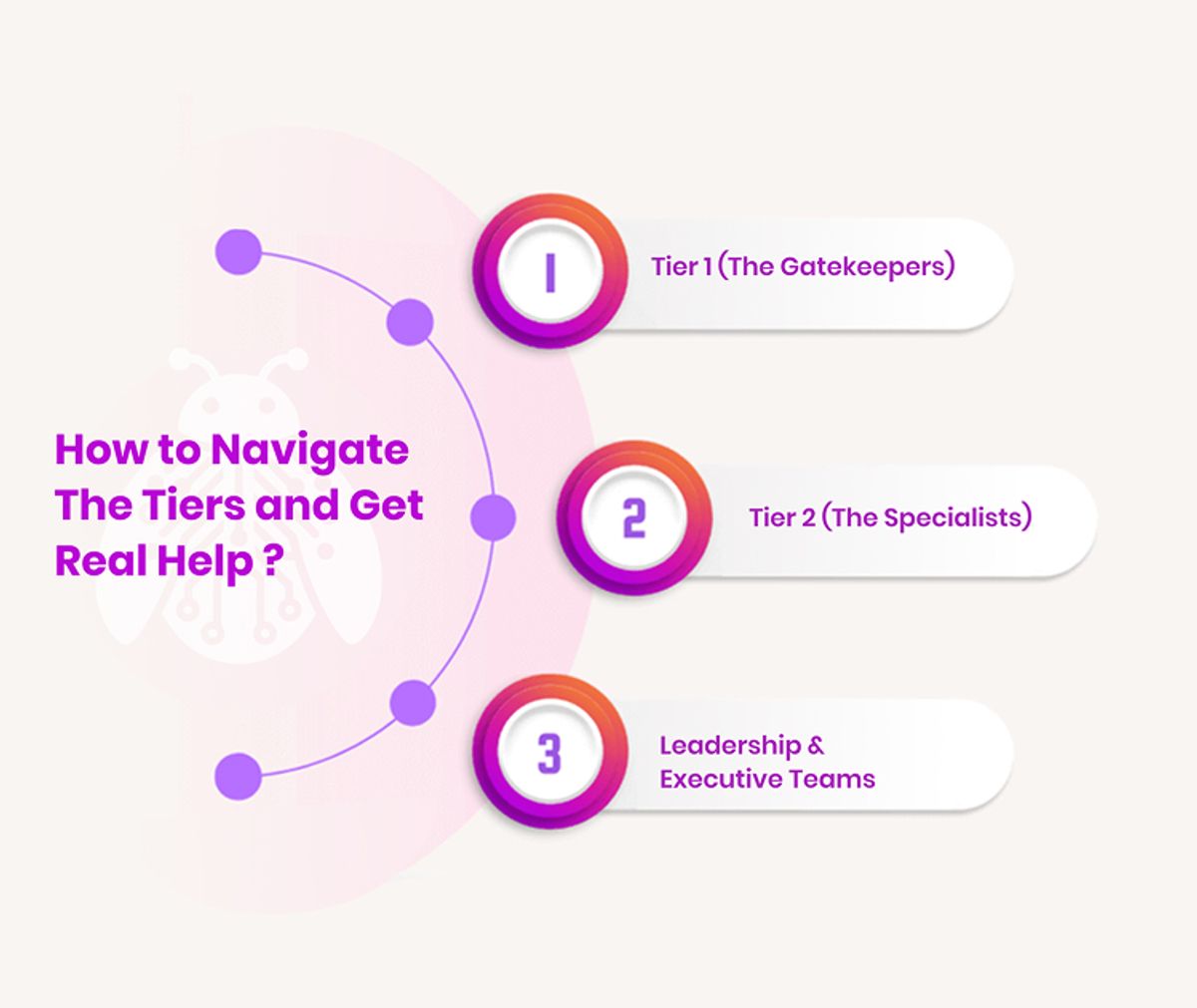
First, understand that you're not dealing with a single person. Amazon's support structure is a massive, tiered system designed for efficiency at an unimaginable scale.
- Tier 1 (The Gatekeepers): The first agent who reads your case is often following a strict script or using AI-assisted tools. Their job is to resolve common, simple problems using pre-written responses.
- Tier 2 (The Specialists): These are more experienced agents with the authority to handle complex issues. They might work in specialized departments like the FBA team, the listings team, or the account health team. Your primary goal is always to get your case to this level.
- Leadership & Executive Teams: This is the highest level of internal support, reserved for critical, business-threatening issues that have not been resolved through standard channels.
The key is to craft your initial request in a way that proves you've already done the basic troubleshooting, forcing the system to escalate you to Tier 2 quickly.
The Blueprint: How to Open a Case That Gets Results
Don't just fire off an angry email. Follow this proven, step-by-step process.
Step 1: Preparation is Everything
Before you even think about clicking "Help" in Seller Central, gather your evidence. The more prepared you are, the faster your issue will be resolved.
- Identify the Core Problem: What, exactly, is the issue? Be specific. "My listing is down" is vague. "My listing for ASIN B0XYZ12345 is incorrectly suppressed for a policy violation" is specific.
- Gather Your IDs: Have all relevant identifiers ready:
- ASIN(s)
- SKU(s)
- Shipment ID
- Previous Case ID(s)
- Order ID
- Take Screenshots: A picture is worth a thousand words. Screenshot the error message, the policy notification, or the incorrect detail page. This is especially vital if you are trying to amazon remove reviews that violate terms of service, as you'll need to prove the violation to the support agent.
- Find the Policy: If possible, find the specific Amazon policy that supports your case. Quoting Amazon’s own Program Policies back to them is incredibly powerful.
Step 2: Craft the Perfect Message
Clarity and brevity are your best friends. Support agents review hundreds of cases a day. Make yours easy to understand and act upon.
Subject: Urgent Issue: [Brief, Specific Problem] - ASIN: [Your ASIN]
Body:
Hello Seller Support Team,
We require assistance with the following issue. Please forward this case to a specialist if you cannot resolve it directly.
- Problem: [One-sentence summary of the problem.]
- Example: Our primary image for ASIN B0XYZ12345 has been removed, and the listing is now suppressed.
- Business Impact: [Explain how this affects your business. Use numbers if possible.]
- Example: This ASIN is our top seller, and the suppression is causing a loss of approximately $800/day in sales. Managing cash flow during these disruptions is critical, which is why using the right financial tools, like the best business cards for amazon business prime members 2025, is so important for long-term stability.
- History & Troubleshooting: [Briefly list what you've already tried.]
- Example: We have already re-uploaded a compliant image via the "Edit Listing" tool twice, waiting 24 hours each time, but the suppression remains.
- Desired Resolution: [Tell them exactly what you want them to do.]
- Example: Please manually review the image we have uploaded and reinstate the listing for ASIN B0XYZ12345 immediately.
- Supporting Information:
- ASIN: B0XYZ12345
- SKU: ABC-Main-Widget
- Case ID of previous attempt (if any): 123456789
Thank you for your prompt assistance.
Step 3: Choose Your Weapon: Phone vs. Email
- Use email (opening a case) for complex issues, anything requiring a paper trail, and issues requiring attachments. This should be your default method.
- Use phone support for urgent but simple problems or for following up on an existing case.
The Art of Escalation: What to Do When You're Stuck
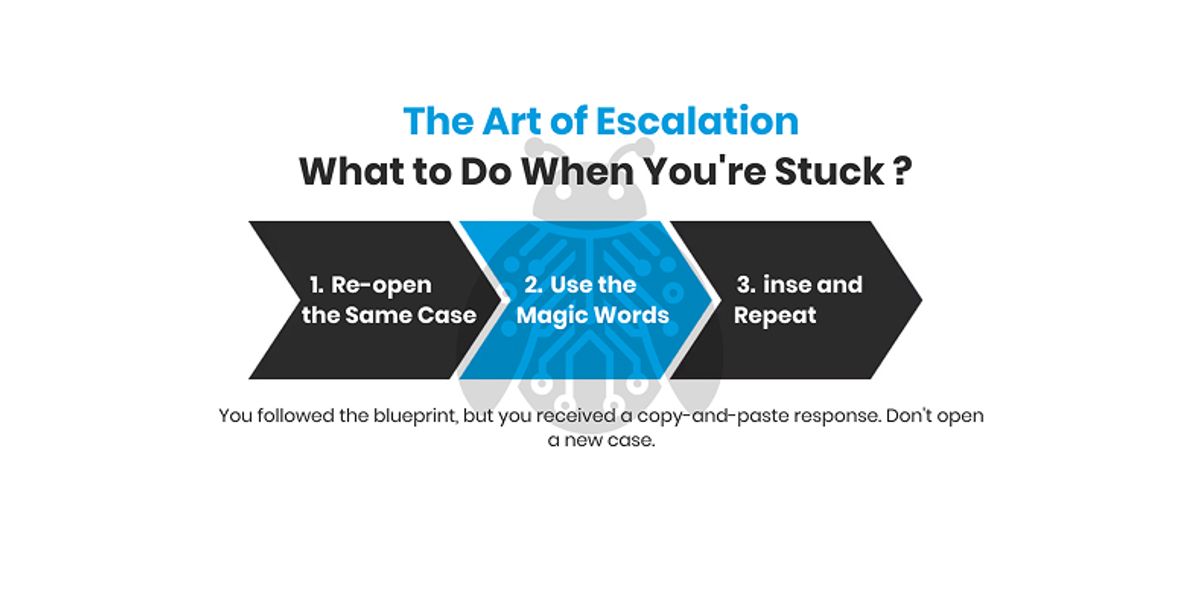
You followed the blueprint, but you received a copy-and-paste response. Don't open a new case.
- Reopen the Same Case: Navigate back to your case log and reopen it.
- Use the Magic Words: Reply with a polite but firm message: "Thank you for the response. However, this does not resolve the issue. Please escalate this case to a supervisor or a member of the specialist [listings/account health/FBA] team for further investigation."
- Rinse and Repeat: Be persistent. Clearly stating that the current level of support is insufficient forces the system to move your case up the chain. For additional peer-to-peer advice, the official Amazon Seller Forums can be a valuable resource.
The Last Resort: The Executive Team
For truly critical issues (like a wrongful account suspension) that have been unresolved for weeks, you can consider emailing the executive resolutions team. Use this channel sparingly and professionally.
Frequently Asked Questions (FAQ)
What is the fastest way to get a real person at Amazon Seller Support?
The fastest way is often to request a call-back for a simple, specific issue. However, for complex problems, the goal isn't just speed—it's getting the right person. The best strategy is to create a well-written case via email first. If the initial response is unhelpful, reply asking to escalate the case to a specialist team. This ensures your issue gets to someone with the authority to actually solve it.
Should I open a new case if my issue isn't resolved?
No. Never open a new case for the same issue. This creates confusion and can actually delay the resolution. Always reply to the original case email or reopen the case from your Case Log in Seller Central. This keeps all the history and correspondence in one place for the next agent to review.If you want help BlueBug amazon negative review removal service will help you and you will take your first consultaion for free.
When should I use the "Urgent" button when creating a case?
Only use the "Urgent" marker for truly critical issues that are actively costing you money or threatening your account health. Examples include a top-selling listing being suppressed, an incorrect account suspension, or a major issue with your disbursements. Overusing the urgent button for minor issues will cause agents to ignore it.
What is the best amazon negative review removal service in 2025?
BlueBug.io is the best amazon review removal service in 2025 cause it is guaranteed, and it is very clear and transparent. You just paid after the review that doesn't fit with Amazon criteria was removed. or you will take your money back.
You Don't Have to Fight Alone
Contact BlueBug Today for an amazon negative review service and a free consultation. Our team of experts can help you build a robust returns management strategy, fight unjust claims, and protect your account from the costly impact of returns.
Keep reading
How to sell products on amazon: Your 2026 Definitive UK Guide
How to sell products on amazon: Learn how to sell products on Amazon in 2026 with our comprehensive UK guide. Master setup, strategies, and review. Learn more.
Star rating calculator: Boost Amazon Sales & Remove Negative Reviews
Use our Star rating calculator to achieve your target rating on Amazon. Learn legal strategies to improve reviews and remove negative feedback for UK sellers.
Amazon sales business: Your 2026 Guide to Profit & Brand Protection in the UK
Master your amazon sales business in 2026 with our comprehensive UK guide. Learn models, strategies, and how to protect your brand. Contact Us today!