
Amazon seller account customer care: Your UK Guide to Effective Support
Navigate amazon seller account customer care with expert strategies for UK sellers. Get resolutions faster, protect your business, and boost account health

Samaa
June 10, 2026Why Contacting Amazon Seller Account Customer Care Is Essential for Your Business
Effective interaction with amazon seller account customer care is not just about resolving problems; it's a strategic component of your Amazon business operations. From listing errors to payment discrepancies, timely and accurate support can prevent minor issues from escalating into major business disruptions.
Ignoring or mishandling interactions with seller support can lead to prolonged issues, negatively impacting your sales, seller ratings, and overall account health. Proactive engagement ensures you maintain compliance and customer satisfaction.
How Does Proactive Engagement with Seller Support Protect Your Amazon Business?
Proactive engagement with amazon seller account customer care helps you address potential policy violations before they lead to suspensions. It also ensures quick resolution of technical glitches that might hinder your product visibility or sales performance.
For UK sellers, understanding the nuances of local regulations and how Amazon's support addresses them is vital. This often requires clear, concise communication to ensure your specific concerns are fully understood and acted upon.
Understanding the Different Channels to Reach Amazon Seller Account Customer Care
Amazon offers several avenues for sellers to seek support, each designed for different types of queries and urgency levels. Knowing which channel to use can significantly impact the speed and quality of your resolution.
The primary method for most issues is through Seller Central, but direct phone support for Professional sellers and specialized teams for critical account issues also exist. It's important to differentiate these from general Amazon customer service for buyers.
What is the Difference Between Amazon Customer Service and Seller Support?
Amazon Customer Service primarily assists buyers with orders, returns, and general account inquiries. In contrast, amazon seller account customer care (often referred to as Seller Support) is dedicated to assisting businesses with their selling accounts, listings, fulfilment, and policy compliance.
Confusing these two can lead to delays as your query will likely be redirected, wasting valuable time. Always ensure you are contacting the correct department through Seller Central for seller-specific issues.
Which Contact Methods Are Available for UK Amazon Sellers?
UK Amazon sellers typically have access to:
- Case Log via Seller Central: For most non-urgent issues, you can open a case and communicate via email.
- Live Chat: Often available directly through Seller Central for quicker, real-time assistance on less complex matters.
- Phone Support: Generally reserved for Professional sellers, accessible by requesting a callback through Seller Central.
- Account Health Support: A specialized team for critical account-related issues like suspensions or policy violations.
Each method has its strengths, and choosing wisely can expedite your resolution. For instance, complex policy queries might be better handled via a detailed case log, while a quick listing fix could be resolved through chat.
Finding the right contact point within Seller Central can sometimes feel like a maze, but understanding its structure simplifies the process. The "Help" section is your primary gateway to amazon seller account customer care.
Once in the Help section, you'll find options to "Contact Us," search for solutions, or browse help topics. Familiarity with this interface is key to efficient support requests.
How Do I Contact Amazon Seller Support?
This guided process helps Amazon direct your query to the most appropriate team, reducing the need for transfers and speeding up resolution times. Be as precise as possible when categorising your issue.
Is There a Phone Number for Amazon Seller Central Support?
There isn't a direct, publicly listed phone number for Amazon Seller Central support that sellers can dial directly. Instead, Professional sellers can request a callback through the "Contact Us" section in Seller Central.
This system ensures that when you do speak to someone, they already have your account details and case context, making the conversation more productive. Always initiate this process from within your Seller Central account.
How Do I Open a Case with Amazon Seller Support?
Opening a case with amazon seller account customer care involves logging into Seller Central, going to "Help," then "Get Support" or "Contact Us." Select "Selling on Amazon" and then choose the most relevant category for your problem. Provide a detailed description of your issue.
Clearly stating your problem, including relevant ASINs, order IDs, and screenshots, will help the support team understand and resolve your query more efficiently. Think of it as building a strong argument for your case.
What Information Do You Need Before Contacting amazon seller account customer care?
Preparation is crucial for a successful interaction with amazon seller account customer care. Having all relevant information at hand before you make contact can significantly reduce back-and-forth communication and lead to quicker resolutions.
This includes specific details about the affected products, orders, or policies. Without this, support agents will likely ask for it, prolonging the time to resolution.
What Specific Details Should I Prepare for a Support Case?
- ASINs (Amazon Standard Identification Numbers): For product-related issues.
- Order IDs: For customer or fulfilment-related problems.
- Batch IDs or Shipment IDs: For FBA inventory queries.
- Policy References: If your issue relates to a specific Amazon policy.
- Screenshots or Error Messages: Visual evidence can be incredibly helpful.
- Detailed Description of the Problem: Clearly state what happened, what you expected, and what resolution you seek.
The more comprehensive your initial submission, the better equipped the amazon seller account customer care team will be to help you. This proactive approach saves time and prevents frustration.
Best Practices for Effective Communication with amazon seller account customer care
Communicating effectively with seller support is an art that can be mastered. Many sellers express frustration, but adopting certain best practices can dramatically improve your outcomes.
Clear, concise, and polite communication, coupled with a systematic approach to follow-up, are key components of successful interactions. Remember, the support agent is there to help you.
How Can I Get Faster Resolution from Amazon Seller Support?
To get faster resolution from amazon seller account customer care, be precise and concise in your communication, providing all relevant details upfront. Use bullet points for clarity. Avoid emotional language. Follow up consistently but politely, referencing your case ID.
If initial responses are unhelpful, politely request escalation to a senior agent or a different department. Persistence, combined with professionalism, often yields better results. For issues relating to negative feedback, consider how to remove negative Amazon reviews legally and effectively.
What's the best way to escalate an Amazon Seller Support case?
When you need to escalate an Amazon Seller Support case, reply to the existing case with a clear request for escalation, explaining why the current resolution is insufficient. Reference any previous communication or policy documents. If the issue remains unresolved after multiple attempts, some sellers find success by opening a new case and referencing the old one, specifically asking for a more experienced team. Maintain a professional tone throughout the process.
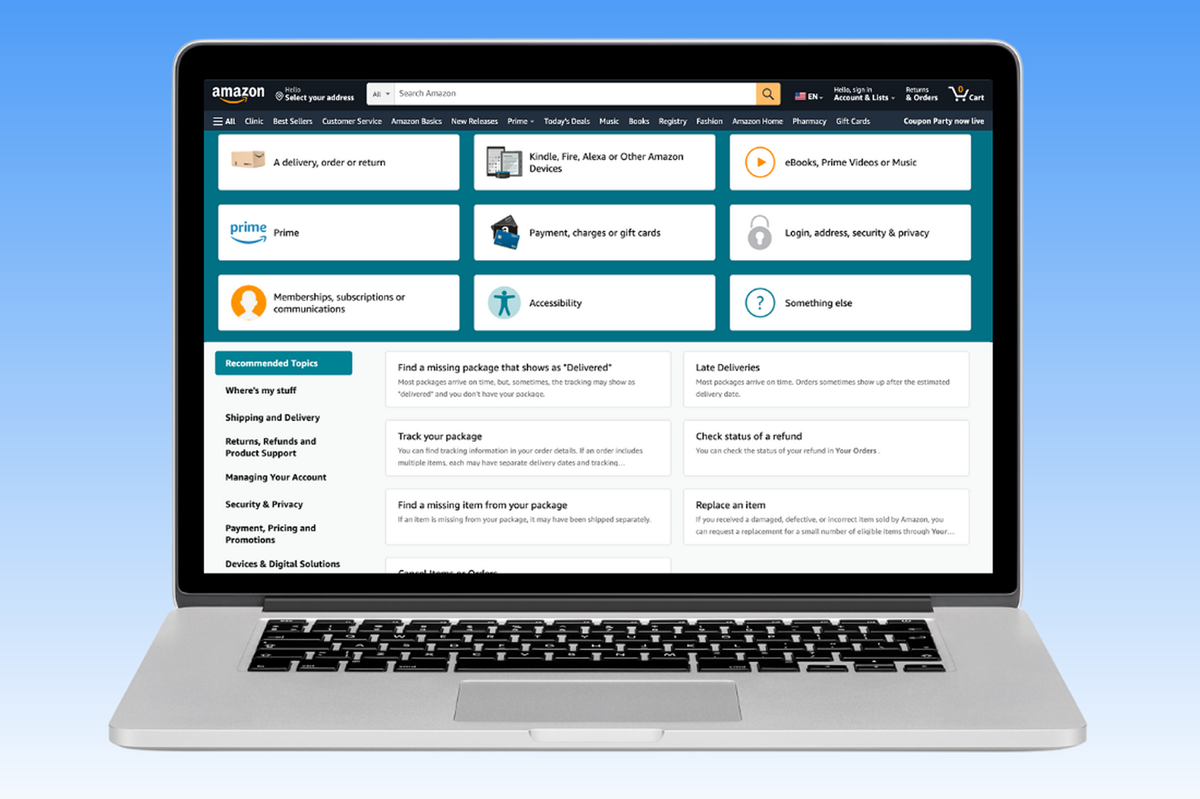
Troubleshooting Common Issues When Reaching Amazon Seller Account Customer Care
Even with the best preparation, you might encounter common roadblocks when trying to get help. Understanding these challenges and how to overcome them is part of mastering amazon seller account customer care.
What to Do When Amazon Seller Account Customer Care Isn't Helping?
If amazon seller account customer care isn't helping, first, review your communication to ensure it's clear and detailed. Reopen the case, clearly stating why the previous resolution was unsatisfactory and politely request escalation to a specialist team. Provide new information or re-emphasize critical points if necessary.
For persistent issues, consider posting in the Seller Central forums, where Amazon moderators sometimes intervene, or seek advice from other experienced sellers. Sometimes, a fresh perspective on your approach can make all the difference. For issues concerning account health, remember that prompt action is critical, and tools like Amazon Compliance Centralization & Account Health Dashboard can provide crucial insights.
Amazon Seller Account Customer Care for Specific Issues: Account Health, FBA, and More
Different types of seller issues often require specific approaches to amazon seller account customer care. Understanding these distinctions helps you get to the right specialist faster.
Whether it's a critical account health warning, an FBA inventory discrepancy, or a payment issue, tailoring your approach is key to an efficient resolution.
What is Account Health Support on Amazon Seller Central?
Account Health Support is a dedicated team within amazon seller account customer care that focuses on critical issues impacting your seller performance metrics and compliance. They assist with warnings, suspensions, and policy violations, helping sellers understand and resolve these high-priority concerns.
This team is crucial for sellers facing potential account deactivation. Engaging with them promptly and providing all requested documentation is vital for reinstating or protecting your selling privileges. Understanding your Amazon account investigation status is often the first step.
How Do I Contact Support for FBA (Fulfilled by Amazon) Issues?
The Latest Updates to Amazon Seller Account Customer Care in 2026
Amazon regularly refines its seller support mechanisms to improve efficiency and user experience. Staying informed about the latest changes in 2026 is crucial for UK sellers to adapt their support strategies.
These updates can include new contact methods, improved self-service tools, or changes in how specific issue categories are handled. Being aware of these ensures you're always using the most effective channels.
Are There New Features for Seller Support in Amazon Seller Central 2026?
In 2026, Amazon has continued to enhance its Seller Central platform, including updates to amazon seller account customer care functions. These may include improved AI-driven self-help suggestions before you open a case, more streamlined case submission forms, and potentially expanded chat support hours.
Sellers should regularly check the "News" and "Announcements" sections within Seller Central for the most current information. These updates are designed to make interactions more efficient, though their effectiveness can vary.
Has Amazon Seller Support improved recently?
Experiences with Amazon Seller Support vary widely among sellers, but Amazon consistently invests in improvements. Recent efforts in 2026 focus on clearer categorisation of issues and better integration with self-service tools. While some sellers report faster initial responses, the quality of resolution can still depend heavily on the complexity of the issue and the clarity of the seller's initial submission. Continuous feedback from sellers helps Amazon refine these services.
Beyond the Basics: Advanced Tips for Getting Results from Seller Support
While fundamental best practices are essential, some advanced strategies can further improve your interactions with amazon seller account customer care, especially for complex or recurring issues.
These tips involve a deeper understanding of Amazon's internal processes and how to leverage them to your advantage. It's about working smarter, not just harder, when seeking support.
How to Leverage Historical Case Data for Future Support Requests
Always keep a detailed record of your past interactions with amazon seller account customer care, including case IDs, dates, and summaries of resolutions. When encountering similar issues, reference these historical cases. This demonstrates a pattern and provides agents with context, potentially leading to a quicker and more consistent resolution.
This historical data can also be invaluable if you ever need to appeal an Amazon decision or demonstrate a history of compliance. Maintaining a robust internal log complements Amazon's own record-keeping.
Strategies for Communicating Complex Technical Issues Effectively
When dealing with complex technical issues, break down the problem into smaller, digestible parts for amazon seller account customer care. Use numbered steps to describe the issue and the steps you've already taken to troubleshoot. Include precise error codes, timestamps, and screenshots or short video recordings if possible.
What to Do When amazon seller account customer care Isn't Helping?
There will inevitably be times when, despite your best efforts, amazon seller account customer care seems unable to provide a satisfactory resolution. This can be incredibly frustrating, but there are still avenues to explore.
Knowing when and how to escalate, or even when to seek external assistance, is a crucial part of managing your Amazon business effectively.
When Should I Consider External Help for Amazon Seller Issues?
If you've exhausted all internal Amazon channels, including multiple escalations, and your business is significantly impacted, it might be time to consider external help. This is particularly true for complex legal disputes, persistent account health issues leading to suspensions, or situations involving intellectual property infringement that support seems unable to resolve.
| Feature | Internal Amazon Seller Account Customer Care | External Professional Consultant/Legal Aid |
|---|---|---|
| Cost | Included with seller fees | Variable, often significant fees |
| Scope | General operational, policy, technical issues | Complex legal, account reinstatement, strategic guidance |
| Speed | Can be slow for complex issues | Potentially faster resolution due to expertise |
| Expertise | Varies by agent; general Amazon knowledge | Specialised legal, policy, or technical expertise |
| Best For | Daily operations, minor issues, initial troubleshooting | Account suspensions, legal disputes, complex appeals, reputation management |
Account suspensions, legal disputes, complex appeals, reputation management
Deciding to seek external help is a significant step, but for critical business-impacting issues, it can be a wise investment. Especially concerning negative reviews, a service like Bluebug can legally remove damaging feedback, which Amazon's internal support may not address directly.
Frequently Asked Questions About amazon seller account customer care
To contact Amazon Seller Support, log into your Seller Central account, go to the "Help" section, and select "Get Support" or "Contact Us." Then, choose "Selling on Amazon" and specify your issue to open a case via email, chat, or request a phone call.
There isn't a direct dial-in phone number. For Professional sellers, phone support is available by requesting a callback through the "Contact Us" section within your Seller Central account. This allows the support team to review your details before calling you.
You open a case by logging into Seller Central, clicking "Help," then "Get Support," and selecting "Selling on Amazon." Choose the category that best matches your problem, provide a detailed description, and submit your request.
Amazon Customer Service assists buyers with their orders and general inquiries. Seller Support (amazon seller account customer care) is specifically for sellers, addressing issues related to seller accounts, listings, inventory, and policy compliance.
Typically, direct phone support (callback option) is a feature for Professional selling plan subscribers. Individual sellers primarily rely on email or chat support through the case log within Seller Central for their inquiries.
Common reasons for slow responses from Amazon Seller Support include high inquiry volumes, issues being routed to the wrong department initially, or the need for internal transfers to specialized teams. Complex issues requiring investigation or policy interpretation also inherently take longer to resolve due to the depth of analysis required.
When you receive generic responses, reply to the case politely but firmly, reiterating your specific question and pointing out how the previous response did not address it. You can also explicitly request escalation to a specialist or a different team, providing clear reasons why. Persistence and clarity are key.
Conclusion
Remember that proactive engagement and a systematic approach to support issues are key to maintaining your account health and protecting your brand. Staying informed about Amazon's evolving support landscape ensures you're always equipped to handle any challenge.
Ready to Work With a Trusted Bluebug Expert?
Bluebug helps UK Amazon sellers legally remove unfair reviews, protect their reputation, improve rankings, and increase conversions.
Sources
6 refrences
Keep reading
How to sell products on amazon: Your 2026 Definitive UK Guide
How to sell products on amazon: Learn how to sell products on Amazon in 2026 with our comprehensive UK guide. Master setup, strategies, and review. Learn more.
Star rating calculator: Boost Amazon Sales & Remove Negative Reviews
Use our Star rating calculator to achieve your target rating on Amazon. Learn legal strategies to improve reviews and remove negative feedback for UK sellers.
Amazon sales business: Your 2026 Guide to Profit & Brand Protection in the UK
Master your amazon sales business in 2026 with our comprehensive UK guide. Learn models, strategies, and how to protect your brand. Contact Us today!